See your project without chasing anyone.
StudioBook is the client portal every Kyndra client gets, included free. It shows what needs your approval, where each piece of work is up to, what’s going out on social, how campaigns are performing, and every file and invoice, in one place your whole team can use.
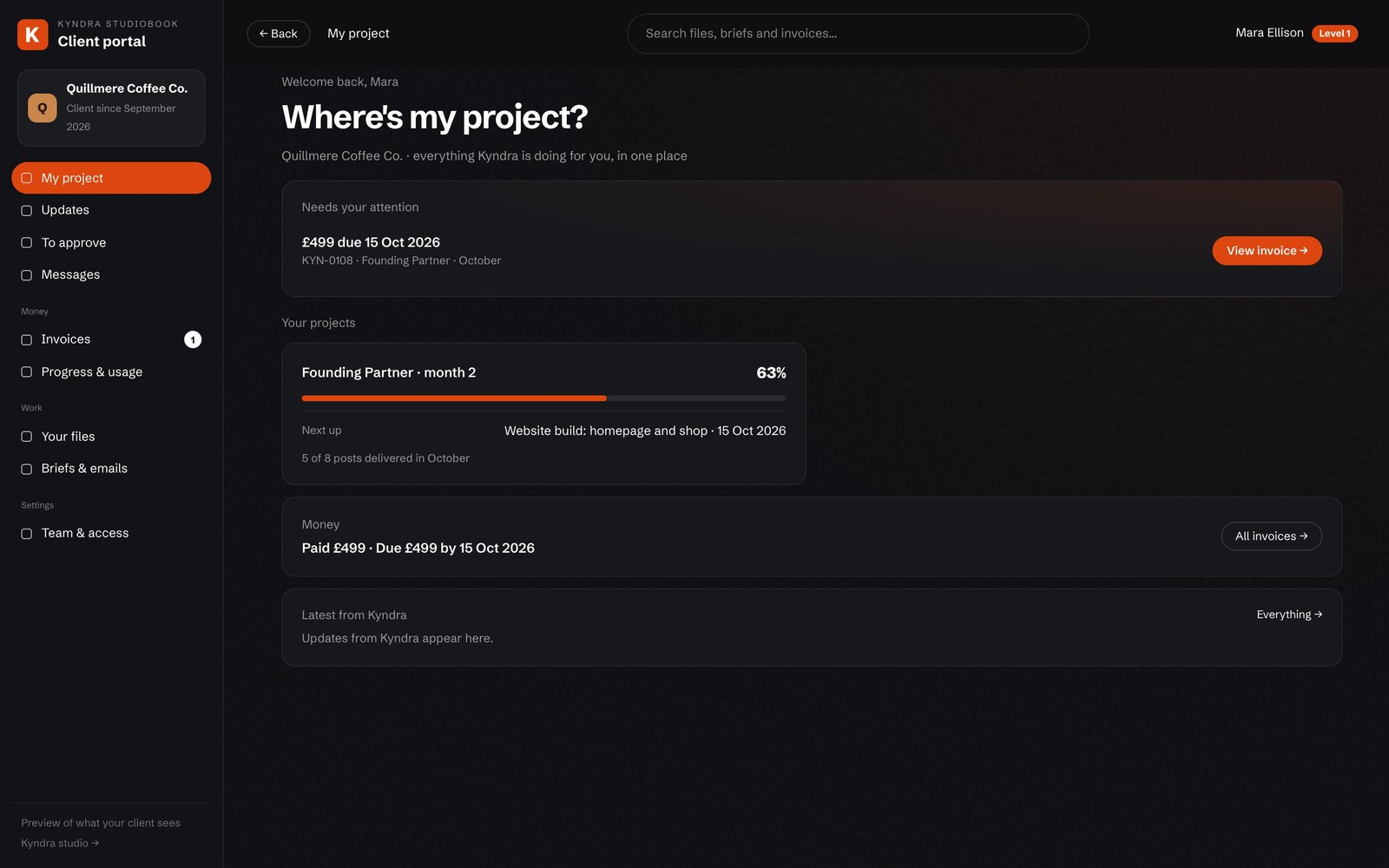 Demo · made-up client
A real StudioBook screen, shown with a made-up client, Quillmere Coffee Co. The tour below recreates the other screens with the same sample client.
Everything you’d normally have to chase
Scroll to see the main parts of StudioBook. The screens use a made-up client, Quillmere Coffee Co., so you can see how it works on a real-looking project.
Where’s my project?
The moment you open it: what needs your attention, every live service and where it’s up to, and what you’ve spent with Kyndra.
Approve work, comment to the second
Watch a video and drop a comment on the exact second you want changed. Leave notes on designs, briefs and proposals, see Kyndra’s replies in the same thread, and approve in one click.
Social calendar
If we manage your social, see what’s going out and when, on which channels, with the copy and the asset for every post.
How your campaigns are doing
Reach, clicks, sign-ups and cost per result for every campaign Kyndra runs, updated as it happens.
Your files
Every video, logo, deck and post we make for you, filed and ready to download, plus your brand pack in one place.
Every invoice, paid or not
Every invoice Kyndra has raised, what’s paid, what’s due and what’s overdue. Download a copy whenever finance asks.
Access for your whole team
Level 1 sees everything, including spend. Level 2 sees the work without the money. Level 3 gets approvals, the calendar and files.
Your assets, approvals and numbers in one place
StudioBook has six sections. Most days you’ll use Home and To approve. The rest is there when you need it.
What needs you, what Kyndra is doing this week and how far each project has got
Timestamped video comments and one-click approvals
Briefs, notes and comments, with every attachment kept
Clicks, sales and return on your spend, plus the social calendar
Every video, logo and deck, always the latest, plus your brand kit
Every invoice, paid or due, and who on your team sees what
Choose what each person sees
When you invite your team to StudioBook, you choose what each person can see. Your marketing lead can approve work without seeing invoices, and finance can download invoices without wading through creative.
Full access
Usually founders and finance. Everything in StudioBook, including spend and invoices.
Work and results
Usually marketing leads. All the work, approvals and campaign results, without the money.
Approvals and files
Usually the wider team. Approvals, the social calendar and files, nothing else.
What is StudioBook?
StudioBook is our client portal, included free for every client. Approve videos, designs and briefs in one click, see what we’re working on this week, track campaign performance, and find every invoice and file in one place. Your team gets access at three levels, so everyone sees exactly what they need.
Do we own the work?
Yes. Once invoices are settled you own the commercial rights to what we make for you: scripts, footage, final cuts and strategy documents.
Who actually does the work?
You work directly with Adam Reynolds and a small team of senior specialists. The person who pitches is the person who does the work.
Does StudioBook cost extra?
No. StudioBook is included free for every Kyndra client, for as long as we work together.